There's another features (again!) of the newest iPod 5th Generation, instantly became popular worldwide because of its built-in video-camera. Camera was just one of its newest feature, I have already posted
"Added Features For Our Beloved Joggers" which tells us that the newest iPod can count your steps and tells you how many calories have you burned.
Evidence of the device exists in the latest
Nike+ iPod user guide, posted on Apple's Web site. The 28-page document includes a section entitled
"Quick Start" which gives step-by-step guide and
"Linking a Nike + iPod Compatible Remote or Heart Rate Monitor." It states that only the fifth-generation ipod nano.
A further subsection of the
User ManualPages 5 to 10,
Quick Start:
Step 1: Enable
Nike and
iPod on your device
- iPod Nano: attach the Nike + iPod receiver to iPod Nano. Nike + iPod appears in the main menu
Step 2: Make sure you have the latest
iPodand
iTunes software
Step 3: Insert the
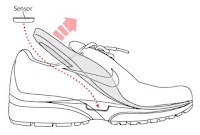
Nike+iPod Sensor in your Nike+ ready shoes
- Lift the insole of the left shoe, remove the foam insert from the pocket underneath, and replace it with the sensor, flat side up
 Step 4:
Choose a type of workout
Step 5: Choose music to accompany your workout
Step 6: Start your workout
Step 7: Monitor your progress
Step 8: End your workout
Step 9: Track your progress at
nikeplus.com
****************************
According again to the
User Manual, page 20 is part entitled
"Linking a Nike + iPod Compatible Remote or Heart Rate Monitor", to have an idea, here are some information about the page:
To link to a Nike+ compatible heart rate monitor (sold separately):
iPod nano (5th generation only): Connect your Nike + iPod receiver to your iPod nano, choose Nike + iPod > Settings > Heart Rate Monitor > Link, then follow the onscreen instructions.
**********************************
If you have any clarification with regards to
Nike + iPod product, click to this
USER MANUAL
------------------------------------------
Great! Perfect for music lovers and now with athletes as well.


