Be Updated! Enter your email here!

Enter your email address:

Delivered by FeedBurner

Wednesday, April 21, 2010

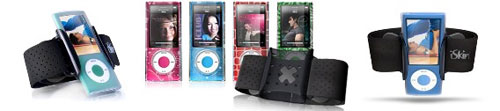
iSkin Offers Antimicrobial Armband Case for iPod Nano 5G


Lots of users take their iPod to the gym and keep them on their arm in one of those strap cases. The problem is that when you exercise sweat and odor can get into the band and make your gear extra smelly.

iSkin has announced a new case for the 5th generation iPod nano that has Microban antimicrobial protection built-in. The Microban protection promises to reduce odors and stains on the armband.


The armband is adjustable and the inner band is made of soft silicone. The case is available now for $39.99 and works with some iSkin cases.
iSkin

Source
=======================
These microbial protection from iPod Nano 5G armband will greatly help those who were conscious with their hygiene.

Wednesday, April 7, 2010

Sony Headset Designs for iPhone and iPod Users

Each headset possesses a discrete in-line remote control that delivers users easy control over functions such as play, pause and skip apart from allowing volume tweaks. The iPod Shuffle’s VoiceOver function can also be controlled with this device. Additionally, iPhone owners can utilize the headset’s integrated microphone for handsfree chatting.

The compact DR-EX300iP in-ear headphone that has a 13.5mm Neodymium driver fits vertically into the user’s ear. Four different sizes of hybrid silicone earbuds provide a secure and comfortable fit into the ears. The headset is touted to reproduce rich, powerful bass sounds within a wide dynamic rage.

It will be offered in a shade of black and come bundled with a leather storage and transportation case. The MDR-EX38iP is out black or white colors with three sizes of hybrid silicone buds and a 9mm Neodymium driver for smooth, deep bass sounds. Both headsets incorporate gold plated stereo mini plugs and cord adjusters.

The dual-purpose DR-V150ipP is fitted with a large adjustable headband, reversible earcups for ‘single-sided’ monitoring and a 30mm ferrite driver for deep bass and power handling. Sony’s MDR-E10iP will be released in shades of pink, gold blue and grey. It features a 13.5mm Neodymium driver and soft ear-pads for comfortable wear.

Sony’s DR-EX300iP, DR-V150iP and MDR-E10iP headsets will be out in May 2010, while the MDR-EX38iP is currently available for purchase. They are compatible with the iPod Shuffle 3G, iPod Nano 4G/5G, iPod Classic 120GB/160GB, iPod Touch 2G and iPhone 3GS.
========================
Well, this gives us more options when it comes to iPod Nano 5g accessories like headsets.

Tuesday, April 6, 2010

Convert Videos and Movies to iPad with a Wonderful Tool

iMacsoft iPad Video Converter is a powerful and easy to use iPad Video Converter, which can convert video to iPad video and audio formats for iPad, iPod and iPhone. iMacsoft iPad Video Converter can convert almost all popular video files.

PR Log (Press Release) – Apr 02, 2010 – The iPad is the first tablet computer developed by Apple Inc. Announced on January 27, 2010, it is part of a device category between a smartphone and a laptop computer. Similar in functionality to a larger and more powerful iPhone or iPod touch, it runs a modified version of the same operating system (iPhone OS), with a user interface redesigned to take advantage of the larger screen. And now it is the most popular electronic product around the world.

Here we will show you a multi-functional iPad video conversion tool to help you convert almost all the popular video or audio formats to iPad video and audio. That is iMacsoft iPad Video Converter.

iMacsoft iPad Video Converter is powerful and easy to use iPad Video Converter software designed just for Windows users to convert video to iPad video and audio formats for playback on iPad, iPod classic, iPod touch, iPod nano, iPod nano 5G, iPhone, iPhone 3G and iPhone 3GS, etc. This iPad Video Converter supports iPad MPEG-4 video at 640 by 480 resolution also. In order to optimize your video and audio effect, iMacsoft iPad Video Converter can assist you to obtain your favorite part of your video, set encoding parameters including resolution, video and audio encoder, frame rate, video bitrate to get the best video quality.

With this best iPad Converter, You are now a few steps into enjoying all kinds of audio and video formats on your iPad, iPod classic, iPod touch, iPod nano, iPod nano 5G, iPhone, iPhone 3G and iPhone 3GS anywhere and anytime.
Source
========================
This tool for ipod nano 5G especially with the newest iPad gave me more reason to enjoy the benefits of your Apple gadgets.

Wednesday, March 31, 2010

Sony Offer New Headsets for iPhone and iPod Users

Those who spend an inordinate amount of time hanging out with their iPods or iPhones may want to read this news if they're looking out for their new headsets. Sony's DR EX-300iP, DR-V150iP and MDR-E10iP headsets have been crafted explicitly for iPhone and iPod users will join the currently available MDR-EX38iP.

The DR-EX300iP is a compact in-ear headphone that incorporates a 13.5MM Neodymium driver which built to fit vertically into the user’s ear. Listening to music for extended periods of time should be comfortable enough with the four sizes of hybrid silicone earbuds provided with it for a secure fit into the ears. The headset renders rich, powerful bass sounds within a wide dynamic rage.

It will be sold with a genuine leather storage and transportation case. It is will be made available in the color black. The MDR-EX38iP is out black or white shades with three sizes of hybrid silicone buds and a 9mm Neodymium driver for smooth, deep bass reproduction. Both headsets feature gold plated stereo mini plugs and cord adjusters.

Sony’s MDR-E10iP headset will be splashed out in shades of pink, blue, gold and grey. It is equipped with soft ear-pads for comfortable wear and a 13.5mm Neodymium driver that renders clear audio. The dual-purpose DR-V150ipP has a large adjustable headband, reversible earcups for ‘single-sided’ monitoring and a 30mm ferrite driver for rich bass and dealing with power.

All of Sony’s latest headset offerings boast of incorporating modest-sized in-line remote controls that are put volume, play, pause and skip controls conveniently within the users hands. Each features an embedded microphone and is compatible with the Apple iPod Shuffle 3G, iPod Nano 4G/5G, 120GB/160GB iPod Classic, iPhone 3GS and iPod touch 2G.

The Sony DR-EX300iP, DR-V150iP and MDR-E10iP headsets will hit shelves this May, while the MDR-EX38iP is already available for purchase.
Source
======================================================================
I love these newest headsets especially for iPod Nano 5G users, hope to see more in different variety of colors.

Sunday, March 28, 2010

New Apple IPod Nano With Camera 8GB - Purple


 Image Source: http://www.bignews.biz/?id=853967&keys=cheapestnano-cheapnano-ipodnano-appleipod

It's even easier to find the song you want to hear. Now you can view your album art in Cover Flow. Or just press and hold the Center button to browse by album or artist. When you find the right song.

Key Features Of Apple Ipod Nano

• Storage Capacity: 8 GB
• Number of Songs: 2000
• Main Storage Type: Built-in Memory

MP3 Player Features:

Built-In Video Camera, VoiceOver Feature, Built-In Speakers, Built-In FM Tuner, Built-In Microphone, Pedometer, Up to 5 Hours Video Playback.

Audio Playback File Format:

WAV, MP3 VBR, Audible (formats 2, 3, and 4), AAC, AIFF, Apple Lossless

The features remain pretty much the same as the 4th generation Nano apart from the obvious addition of video recording. This can be accessed through the menu and footage can be recorded in landscape or portrait. Sound will be captured too through the built-in microphone and sound is played when you view your footage back.

There are also 15 video effects so you can create a personal touch to your footage such as X-Ray or Sepia for example. When you connect your Nano 5G to your PC or Mac your footage is automatically sync'd so it is uploaded and saved, from there it can be transferred to your favorite networking sites to share with family and friends.

The Genius feature is, well, Genius. It will create a play list of songs that go well together and save them to play later or play straight away. The FM Radio +Live Pause features is really cool too. You can pause Live Radio and catch up again when your ready and will even let you rewind up to 15 minutes so you don't miss a thing.
Source
======================================================================
Wow! Truly new to my eyes these purple ipod nano 5G. Nice looks!

Thursday, December 17, 2009

Nine New Features of iTunes 9


Prior upon the announcement of the newest version of iPod Nano. One of its popular newest features is its newest version of iTunes---iTunes 9.

And, as Jobs promised, the new version of iTunes is available for download. This update to the most popular media player software brings a slew of small tweaks and big features.

You'll notice some of them immediately when you boot up the jukebox, but others are under the hood. So, we broke down some of the most notable changes.

You will need this guide: Apple attempts to alleviate the transition to the new application with an introductory video that launches the first time you open iTunes 9. It's pretty informative -- if you can get it to download.

Perhaps due to an influx of new users following the announcement, the tutorials took more than 20 minutes to load. Before that, we waited a few minutes for the new version to prep our music library. If you're impatient, start the install process now and keep reading this guide.

New look: iTunes' software design has traditionally been ahead of the rest of Apple's software. This new version introduces a number of noticeable visual tweaks in addition to a completely redesigned store. Apple has also given more options to the browser view, which lets you more easily sort through artists and albums. The new look is getting some mixed first reactions on Twitter.
Share on Twitter and Facebook: Speaking of Twitter, Apple is finally embracing social media, albeit in a pretty small way. The iTunes Store now has buttons to easily send messages on Facebook and Twitter about your favorite songs and videos. Baby steps.

iTunes LP adds goodies to album purchases: Thanks to chatty music execs, news of iTunes LP, formally called Cocktail, leaked long before the conference. But the store's new section of media-rich albums is definitely worth checking out. With versions containing digital booklets and ...

... behind-the-scenes videos for the Doors, Dave Matthews Band and Phish, it's a stoner's paradise. There's a similar feature for movies, called iTunes Extras.

Home Sharing lets you sync multimedia between five computers: College students living in dorms know all about the music sharing feature that's been around for a while. (A quick definition: It lets you stream songs from another computer's library as long as it's on the same wired or wireless network.)

Now, you can actually download those songs to your own library if the original buyer enters his iTunes Store password onto your computer.

Apple bills it as a feature for keeping music synchronized between your and your family's many home computers. But students will no doubt turn this into an exclusive circle of socialist song trading. Or they'll continue swapping music using torrents and memory sticks like they've been doing for years.

Genius Mixes: Genius just got smarter. The Genius feature lets you create play lists of similar songs spawned from a song of your choosing. Using Mixes, songs of a similar genre are automatically arranged together into a new section.

Here's a tip: You won't see the feature right away when you first load the software. You'll need to click "store" in the menu bar and select "update Genius" to generate the play lists.

Better organize iPhone and iPod Touch files in iTunes: Vocal iPhone users have long been requesting the ability to rearrange the placement of apps on the device's home screen using their computers. Adding this feature, the new iTunes also gives more flexible options for synchronizing large libraries with not-so-large iPods.

For bookworms, iTunes U improvements: ITunes U, the little-known educational-resources section of the store, is getting more attention. Lecture videos and podcasts now have their own cubby in your library and a more prominent spot on the store.

More technical options for importing songs from CDs: Are you still buying CDs? Really? I guess you'll have to get the remastered Beatles albums onto your iPod somehow.

ITunes 9 gets a new option to rip songs using a new high-efficiency encoding setting. HE, as it's called, is billed as a more advanced lossy format -- meaning your music will sound really good without eating up a lot of disc space.

The option is a buried in the settings menu, though. To turn it on, open iTunes settings; under "general," click "import settings;" in the AAC "setting" box, click "custom;" now, check "use high efficiency encoding (HE)."
--------------------------------------------------------------
Nice!!! More awesome features from the biggest online music store.
Tuesday, December 15, 2009

Trouble Shooting iPod Nano 5G

It's been quite a long time since the iPod Nano 5G was first introduced by Apple CEO Steve Jobs. The product warranty was not yet expired, but you want to troubleshoot the iPod on your own. Maybe this was just a minor problem. Here are some solutions to these minor problems regarding with your iPod Nano 5G.

Reset

To reset your iPod:

* 1. Toggle the Hold switch on and off. (Slide it to Hold, then turn it off again.)
* 2. Press and hold the Menu and Center (Select) buttons simultaneously until the Apple logo appears, about 6 to 10 seconds. You may need to repeat this step.

Retry
Retry your iPod with a different USB port on your computer, not a USB port on your keyboard or hub.


Restart
Restart your computer, and make sure that you have the latest software updates installed.
Note:

* To update your Windows software, select Windows Update from the Tools menu of Internet Explorer.
* To update your Mac OS software, select Software Update from the Apple menu.


Reinstall

* To update and reinstall your iPod software, first download the latest version of iTunes.
* Next, open the new version of iTunes and connect your iPod to your computer.
* Select your iPod in the source list and click "Check for Update" under the Summary tab. iTunes will check to see if your iPod needs to be updated and perform the update for you.


Restore

* Note: Because Restore erases all of the songs and files on iPod, make sure to back up any files you've saved on the iPod disk. All of your songs, videos, podcasts, audiobooks, and games can be loaded back to your iPod provided that you have them stored in your iTunes Library.

How to restore your iPod:

* 1. Make sure you've reinstalled the latest version of iTunes.
* 2. Open iTunes, and then connect your iPod to your computer.
* 3. After a few moments, it will appear in the source list in iTunes. If the iPod's display doesn't show "Connected" or "Do not disconnect" you may need to put the iPod into disk mode to proceed.
* 4. Select your iPod in the source list and you will see information about it appear in the Summary tab of the main iTunes windows.
* 5. Click the Restore button. You will be prompted with one or more restore options that may prompt iTunes to automatically download of the latest iPod Software. There were 4 more possible restore options. Just click here.
* 7. During the stage 2 of the restore process, the iPod will show an Apple logo as well as a progress bar at the bottom of the display. It is critical that the iPod remains connected to the computer or iPod Power adapter during this stage. Note: The progress bar may be difficult to see since the backlight on the iPod display may be off.
* 8. After stage 2 of the restore process is complete and the iPod is connected to the computer, the iTunes Setup Assistant window will appear asking you to name your iPod and choose your syncing preferences similar to when you connected your iPod for the first time.

For complete step-by-step guide in troubleshooting your iPod Nano 5G, go to apple.com/support

------------------------------------------------------
Some simple remedy for minor iPod problems. Nice!