Be Updated! Enter your email here!

Enter your email address:

Delivered by FeedBurner

Wednesday, October 28, 2009

iPod Nano Clone: The mp5 Nono

Chinagrabber has just cloned iPod Nano 5G.  It looks pretty close to the real thing. Is it worth buying? We’re not sure as they did not specify camera functionality.Is it worth buying? We’re not sure as they did not specify camera functionality. I’m assuming the 1.3 MP camera can shoot videos and static images. The screen size is another disappointing factor as it takes a mere half of the area of the face. It’s 2.4 inches diagonal length gives us an idea how big the Nono is (read on for the illuminating photo). It’s also a pretty chunky knock-off. But for $55 you already get a 4GB PMP (it has an FM tuner and plays AVI, MP4, RMVB), amazing cheap. News from: pmptoday.com


iPod Nano 5G clone

Features: (or click here)
• Memory: 4GB
• Display: 2.4 inch high definition screen
• Support 1.3MP high resolution camera
• Bulit-in lounderspeaker
• Video format: AVI, MP4, RMVB ect.
• Support e-book reader, FM radio, sound recording
• Support game function
• Support memory card expand slot
• Nano 5th generation, very fashionable and classical


--------------------------------------------------------------------
For me, nothing compares to original. A cheaper ones means a lower quality. 

Wednesday, October 21, 2009

Trouble Shooting iPod Nano 5G

It's been quite a long time since the iPod Nano 5G was first introduced by Apple CEO Steve Jobs. The product warranty was not yet expired, but you want to troubleshoot the iPod on your own. Maybe this was just a minor problem. Here are some solutions to these minor problems regarding with your iPod Nano 5G.

Reset

To reset your iPod:

* 1. Toggle the Hold switch on and off. (Slide it to Hold, then turn it off again.)
* 2. Press and hold the Menu and Center (Select) buttons simultaneously until the Apple logo appears, about 6 to 10 seconds. You may need to repeat this step.

Retry
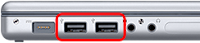
Retry your iPod with a different USB port on your computer, not a USB port on your keyboard or hub.


Restart
Restart your computer, and make sure that you have the latest software updates installed.
Note:

* To update your Windows software, select Windows Update from the Tools menu of Internet Explorer.
* To update your Mac OS software, select Software Update from the Apple menu.


Reinstall

* To update and reinstall your iPod software, first download the latest version of iTunes.
* Next, open the new version of iTunes and connect your iPod to your computer.
* Select your iPod in the source list and click "Check for Update" under the Summary tab. iTunes will check to see if your iPod needs to be updated and perform the update for you.


Restore

* Note: Because Restore erases all of the songs and files on iPod, make sure to back up any files you've saved on the iPod disk. All of your songs, videos, podcasts, audiobooks, and games can be loaded back to your iPod provided that you have them stored in your iTunes Library.

How to restore your iPod:

* 1. Make sure you've reinstalled the latest version of iTunes.
* 2. Open iTunes, and then connect your iPod to your computer.
* 3. After a few moments, it will appear in the source list in iTunes. If the iPod's display doesn't show "Connected" or "Do not disconnect" you may need to put the iPod into disk mode to proceed.
* 4. Select your iPod in the source list and you will see information about it appear in the Summary tab of the main iTunes windows.
* 5. Click the Restore button. You will be prompted with one or more restore options that may prompt iTunes to automatically download of the latest iPod Software. There were 4 more possible restore options. Just click here.
* 7. During the stage 2 of the restore process, the iPod will show an Apple logo as well as a progress bar at the bottom of the display. It is critical that the iPod remains connected to the computer or iPod Power adapter during this stage. Note: The progress bar may be difficult to see since the backlight on the iPod display may be off.
* 8. After stage 2 of the restore process is complete and the iPod is connected to the computer, the iTunes Setup Assistant window will appear asking you to name your iPod and choose your syncing preferences similar to when you connected your iPod for the first time.

For complete step-by-step guide in troubleshooting your iPod Nano 5G, go to apple.com/support

------------------------------------------------------
Some simple remedy for minor iPod problems. Nice!

Wednesday, October 14, 2009

iPod (4G for now) Get Some Cool Sliding Speakers

Although this blog is about iPod Nano 5G. I posted an accessory for iPod Nano 4G and iPod Touch because I think this will be possible in the latest ipod Nano 5G in the near future. If ever that it won't happen, at least I give a bit of information about this cool stuff.


Green Power has rolled out a sliding speaker for iPods, offering a touch of class to your iPod Nano and iPod touch since both devices do not come with built-in speakers unlike the iPhone 3GS. This more or less makes it a portable dock, although you won't be able to bring the house down with its twin 1.5W speakers. A miniUSB port allows you to juice up the device, where a full charge ought to last up to 12 hours of non-stop playback. You can choose from a crystal hard case or half-mirror designs as well as a variety of colors. No idea on pricing or availability though.

News from ipods.techfresh.net

-------------------------------------
Cool! Sliding speaker for a mp3 player give me an impression of having a cellphone with siding keypad.

Tuesday, October 13, 2009

Make Your iPod Nano Looks Like A Camera?

Well, it's been quite a long time since my last post. Sorry for that, but I posted almost anything that is for me the most essential information about this iPod Nano 5G thing. I'm not running out of ideas, I'm just thinking that if you just read all my post,at least I gave you some of the answers to your questions about this newest iPod.

For the sake of adding a post that I hope may interest you, I post about this one of the newest accessory of iPod Nano 5G.

iLuv has announced new iPod Nano cases developed specifically for the fifth generation iPod Nano. Available in pink, blue and black, these cute cases are made from clear plastic.

Priced at $24.99, the iLuv case makes Apple’s newest Nano look like a pocket camera as it includes a decal of a fake zoom lens to the right of the music player as well as a flash that covers the location of the video camera lens.

In some ways, it’s iLuv’s silent protest of Apple’s failure to include a digital camera that can take still pictures.

This news is from coated.com

----------------------------------------------------
Just for fun, this can make you think that your iPod can have a lens of a real digital camera. But is it possible in the future? Maybe. Who knows. LOL.

Saturday, September 26, 2009

What's On Mrs.Obama's iPod


I read a news about G-20 Summit held in Pittsburgh, Pennsylvania from September 24-25 2009. The meeting of leaders of countries that represents 85% of the world's economy discussed which actions to take for a sound recovery from the global economic and financial crisis. But an interview with Michelle Obama during the summit caught my attention. It's about the content of her iPod, some of us may wondering. From Google News:

In an interview from Associated Press, she was asked "Hey, Michelle Obama — what's on your iPod?"

Her response was "Sara Bareilles, among other things."

"I love her," Mrs. Obama gushed Friday, giving a shout-out to Bareilles for the performance she was giving at a concert the first lady organized for students at the Pittsburgh Creative and Performing Arts School.

"She is on my iPod. She has gotten me through many a day," Mrs. Obama said, ticking off the names of two of Bareilles' songs, "Gravity" and "Love Song." Bareilles performed the latter selection during the show.

Mrs. Obama could hardly contain her excitement as she said country crooner Trisha Yearwood, "another of my favorites," and cellist Yo-Yo Ma would be performing.

"You know, what more is there to say?" she said after uttering the world famous cellist's name. "I'm just (as) excited as you all."
----------------------------------------
If you're also interested on what's on the American president's iPod, some of them are songs from Howlin' Wolf, Yo-yo Ma, Sheryl Crow, and some 30 songs from Dylan. Well I just read it from rollingstone.com.

Thursday, September 24, 2009

iPod Nano Privacy Concerns


Lately I've been thinking of what can I post about my blog. My blog was limited to iPod Nano 5G so I just post about someone's review or how they test the quality of the newest Apple's gadget. I almost gathered all info about this tech wonder. I think I'll just give you a bit news on where to use and where not to use this iPod with built-in video-camera. With regards to privacy, some places like in gym banned using the latest iPod. Here is the news from appleinsider.com:
------------------------------------------
A major chain of gyms has banned the new iPod nano with camera from its locker rooms; Adobe claims Lightroom is four times as popular as Apple's Aperture.

iPod nano with camera not welcome in locker rooms

Apple's new iPod nano sports a slim form factor that includes a video camera. The tiny size of the device has become a concern for Life Time Fitness, a company that runs 84 gyms in 19 states. As a result, the new iPod nano has been prohibited from use entirely in the facilities' locker rooms.

In a new report from the Pioneer Press, company spokesman Jason Thunstrom said it is impossible to tell whether a user is choosing a song to play or shooting a video. Bans have also been placed on camera-equipped cellphones at health clubs for years.

The company will allow exercisers to use the new iPod nano while working out, but shooting video while exercising is also prohibited.

The fifth-generation iPod nano has a total size of 1.1 cubic inches. The 8GB model ($149) can record up to 7 hours of video, while the 16GB capacity ($179) can capture 14 hours.

------------------------------------
We all deserve some privacy, I think it's a good thing to respect that privacy.

Wednesday, September 23, 2009

Test Drive Nano's Camera: With FERRARI f430 Spider


Recently I posted so many features of the latest iPod Nano 5G. I posted some what I can call test drive of its most famous features-----iPod's built-in video-camera. But this one is literary a test drive.


Courtesy of Hideki Francis Onda comes the best demo of the iPod's camera that I've seen to date. The iPod was taped to the front bumper of a Ferrari f430 Spider, and the resulting video (taken at Fuji Speedway) is below. Keep an eye out for the spinning Porsche at the 2:45 mark.


Such a great quality of the video for such a tiny gadget. It's just the sound, well you can adjust it anyway,lol. For more info, go to asia.cnet.com

---------------------------------------------------
Wow! A real test drive, great video quality!